
Apex Legends
VERIFIED BY EARLY-ACCESS PLAYERS
✓ Compatible✓ Works out of the boxBan risk today: none known
Setup guide →
Your input. Your rules.
The game thinks a controller is plugged in — you keep playing keyboard & mouse as usual. €19.99 once — yours forever.
Warzone · Apex · Fortnite — tested by us · more games with aim assist · 4.8★ from early-access reviews
Questions before you buy? Discord — real answers in minutes, config drops included. Prefer to read? Read the FAQ ↓
// 01 — How it works
Two minutes from download to gameplay: the driver installs itself on the first run, and the only thing Windows asks you to confirm is one prompt.
A single .exe (~220 MB) — no installer, no setup. The official driver installs itself on first run — just confirm the Windows prompt.
Pay with PayPal or a card. Your activation key lands in your email within a minute.
Enter your key, pick a game config — defaults for every major title, community configs one click away — and you're in. Everything else happens in-game.
// 02 — Features
Curves, deadzones, human-paced sticks, anti-recoil and macros — the whole mouse-to-controller aim pipeline, tuned once per game.
Input goes straight to the virtual controller — no overlays, screen capture or extra processes.
Default configs for every major game, plus community configs from Discord. Load, tweak and switch in two clicks — set it up once and it follows you from title to title.
Fixes, new presets and features ship as free updates. A forever license means forever updates.
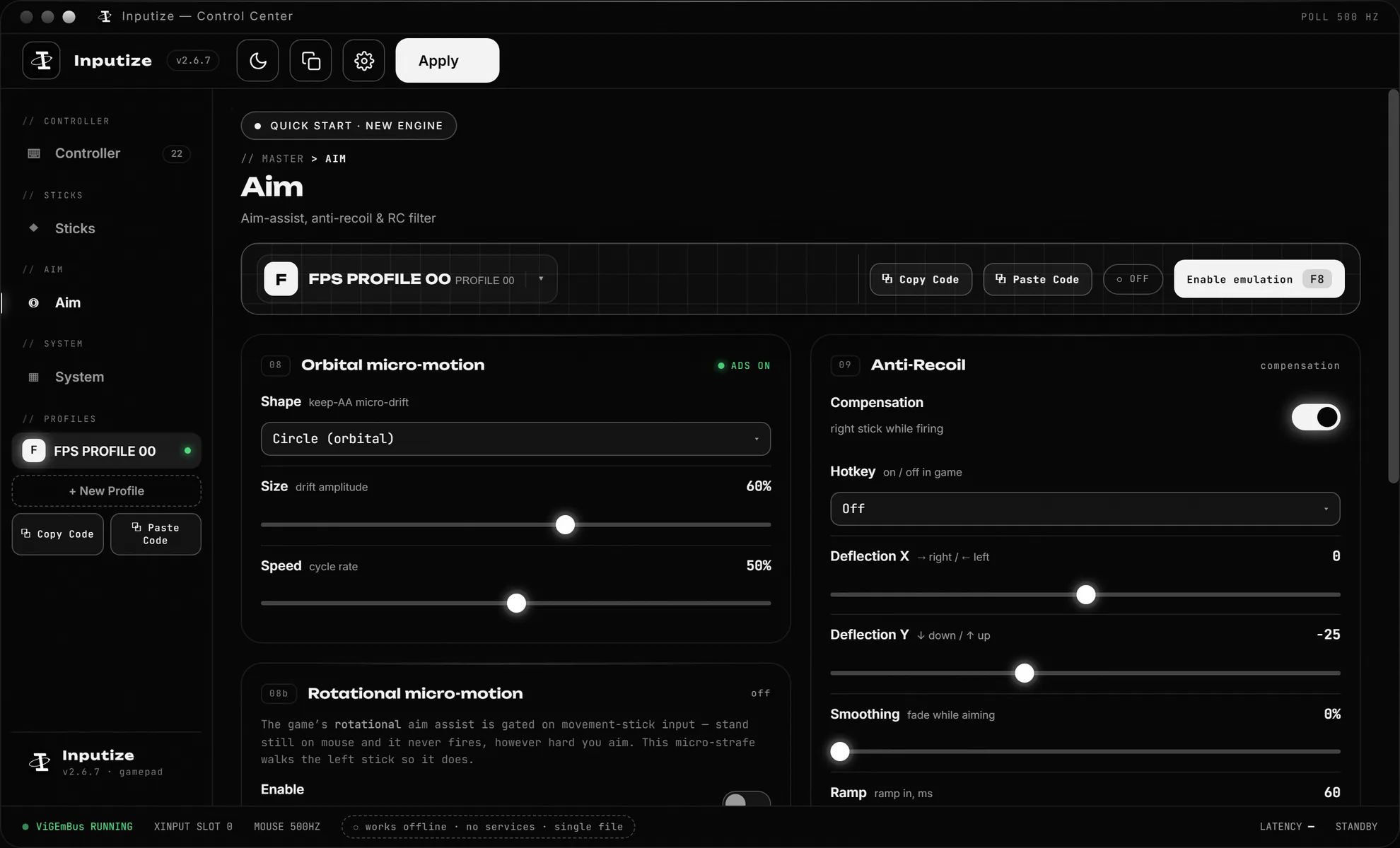
While you fire, the right stick smoothly deflects against your weapon's kick — the camera stops climbing without you fighting it, so your aim assist stays engaged instead of resetting. Per-weapon tuning: X/Y compensation, ramp, release and delay, one profile per weapon class. The Warzone tuning guide →
Any key or mouse button can play a timed sequence of pad presses — bind a combo once and trigger it every time identically. Normal / Hold / Turbo / Double / Toggle / Combo modes cover everything from quick-access gear to rapid fire, and the editor ships with per-game templates.
Every gesture is rebuilt as an eased human-paced ramp with per-gesture variance — no two inputs identical. Pair with high in-game sensitivity (why →). No undetectability promises — check the rules of what you play.
// 03 — Anti-cheat safety
Built on the same driver DS4Windows and Parsec use. ViGEmBus is Microsoft-signed and installed on millions of machines — flagging it would break those mainstream apps at once.
Aim assist on your mouse — the same as on a controller.
01 · YOU
Mouse & keyboard
You play exactly as you always have — your hands, your sensitivity, your muscle memory.
02 · INPUTIZE
Becomes a controller
Your mouse is written as right-stick movement on a virtual Xbox 360 pad — the same signal a real pad sends.
03 · THE GAME
Controller aim assist
It sees a standard Xbox 360 pad, so the assist works for your mouse exactly as it does for a pad player.
✓ aim assist applies
WHAT THE ANTI-CHEAT SEES
✓no injected code✓no game-file access✓no memory reads
Ordinary Windows input — the same surface any remapping or virtual-pad tool uses.
We never inject anything into the game or its files. Inputize works only with Windows input and hands the game a normal Xbox 360 pad through ViGEmBus — nothing is injected, nothing is read, nothing is hidden; the game simply sees a standard Xbox 360 controller. No game has ever publicly banned a player for Inputize, and the diagram above shows why there is nothing to ban you for. The two cases people ask about target something else — EA's bans hit Cronus hardware, and The Finals' 1.4.1 line gates aim assist rather than banning anyone.
// 04 — Every screen
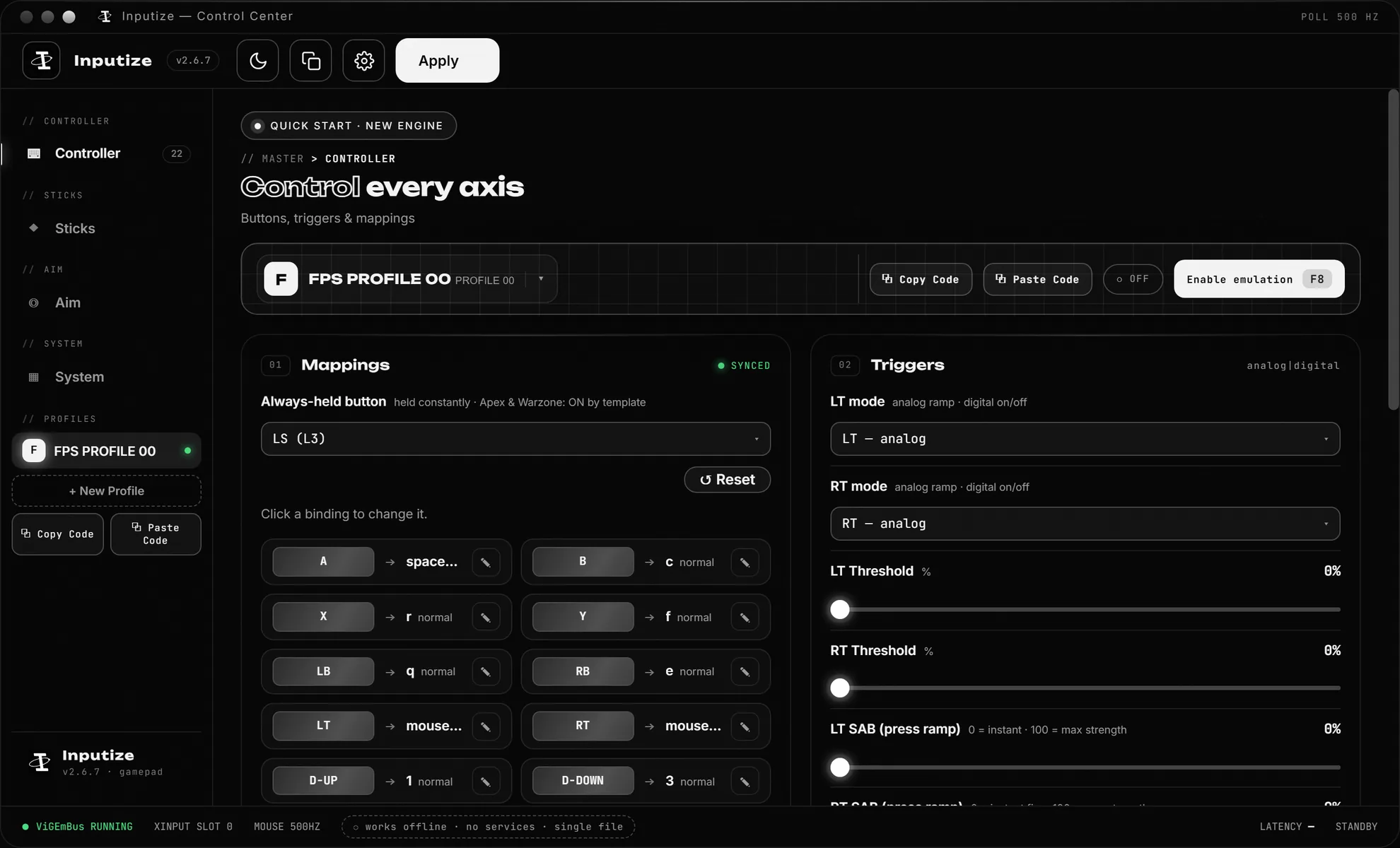
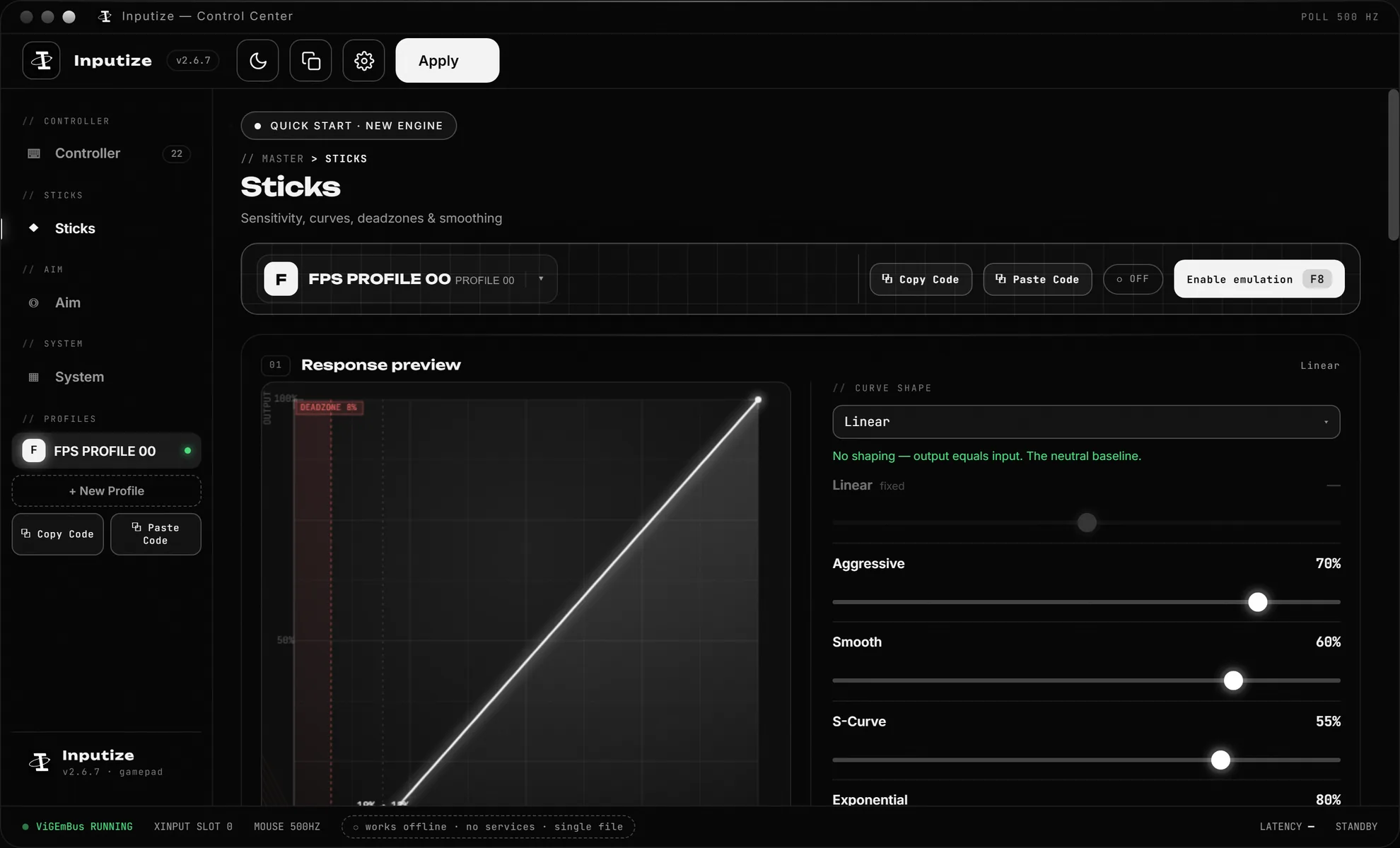
Three views, one job: capture your input and shape it honestly. Real screenshots of the shipped app — switch the tabs.
// 05 — Game compatibility
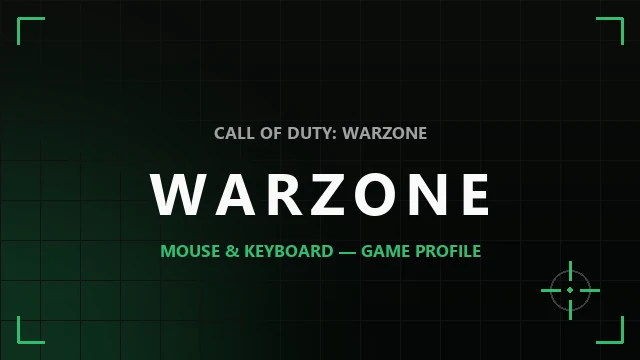
Yes — aim assist on your mouse in every game that gives controller players assist on PC. The game just sees a normal virtual Xbox 360 pad, so shooters, action and racing all work out of the box. Where a title gives no assist at all (CS2, R6 Siege) the pad still works — you play without the bonus, exactly like a real gamepad would. Cards with footage are frames from our own recordings.
VERIFIED BY EARLY-ACCESS PLAYERS
VERIFIED BY EARLY-ACCESS PLAYERS

TESTED BY US

VERIFIED BY EARLY-ACCESS PLAYERS

TESTED BY US · IN-GAME SENS → 0

TESTED BY US
PAD WORKS · NO AIM ASSIST
PAD WORKS · NO AIM ASSIST
NOT LISTED? IT STILL WORKS
Statuses: "verified" — reported by multiple early-access players; "tested by us" — confirmed in our own runs. "None known" — no documented public bans tied to virtual-controller software in that title. Policies differ per game and change over time — check the rules of what you play. Game art belongs to the respective publishers; Inputize is not affiliated with them. Full breakdown with sources →
// 06 — Reviews
Published as written — including the quote that takes a star off for a fiddly first evening of tuning. Early-access reviews are a small sample: read them as players talking, not as a rating you can lean on yet.
"Played mouse and keyboard my whole life — never once held a pad properly. In Apex everyone's on controller with aim assist and I wasn't about to relearn years of muscle memory. The emulator just makes the game think a gamepad is connected while I play with my mouse like always. Aim assist works now, aim feels exactly the same. Best of both worlds honestly."
"Tried playing with a mouse once before and it felt like playing through molasses — no aim assist at all. This one's different — mapped my mouse to the sticks, tuned the sensitivity once, and the game treats it like a real pad. Played a few rounds of CoD and honestly forgot it was emulating. Aim assist kicks in exactly like it should."
"Had it for about three weeks now. Setup isn't instant — you install the ViGEmBus driver (UAC confirm, one reboot) and you'll spend an evening tuning sensitivity and deadzones per game; the presets get you close but not perfect. Once it's dialed in though it just works: Apex reads it as a controller, aim assist behaves, and I can finally keep my mouse. Taking a star off only because the first-time setup could be friendlier."
"Bought it when early access opened and it's been my daily driver since — months of Warzone and Apex through the emulator. Zero bans, zero warnings, account and inventory untouched. It shows up as a normal Xbox 360 controller, same driver DS4Windows has used for years, so nothing about it reads as sketchy. I check in with the Discord crowd regularly and nobody's had an issue either."
Real early-access feedback, quoted with permission — names shortened for privacy. Join the Discord above to read the full threads and add your own.
// 07 — Community
Setup help, config drops, roadmap votes and early builds — straight from the people who actually run Inputize. Ask before you buy, or grab a ready-made profile for your game.
150+ players in Discord
Free to join · invite never expires · no spam
Need one-on-one help? Skip to Support ↓
// 08 — Pricing
Emulator is a one-time purchase; AI Assist is a subscription with no auto-charges. Everything is delivered to your email and works on Windows 10/11.
✓ Not a cheat — no bans known
Nothing is injected, no game files are touched, and no game has ever publicly banned a player for Inputize. Per-game picture: the safety page.
✓ Ready configs — no tuning marathon
Default profiles for the popular games are built in: install, pick your game, press F8. About two minutes; every slider is there if you ever want it.
For keyboard & mouse
€19.99/ forever
One-time €19.99 forever · reWASD All-In from ≈ $40 · XIM Matrix ≈ $125 hardware
Lifetime license — all future updates included, no subscriptions
Digital license, all sales final — full terms in the FAQ
Pay your way — PayPal, card or СБП
Pay in € or $ — PayPal and international cards convert the currency automatically; Visa and Mastercard work in € or ₽; МИР and СБП (₽) — for Russian banks. Your activation key is delivered automatically once the payment is confirmed.
// 09 — FAQ
Straight answers on what it touches (nothing inside the game files), what it costs, who decides the ban question, and what AI Assist does and does not do.
It's a program that creates a virtual controller in Windows. The game thinks a gamepad is connected while you play with mouse and keyboard — so you get the game's controller aim assist on your mouse, and everything is set up in a couple of clicks.
No — it's not a cheat, and there is nothing to ban you for. Inputize never touches game files, never reads game memory and never injects into game processes: it works only with Windows input and creates its pad through ViGEmBus, the Microsoft-signed driver DS4Windows and Parsec use. No game has ever publicly banned a player for Inputize — the per-game picture and the two exceptions people ask about are on the safety page.
Pay with PayPal or a bank card — in € or $ (PayPal and international cards convert the currency automatically); SBP (₽) works too. Your activation key is delivered automatically right after payment.
Right after the payment is confirmed, your activation key is sent to your email within about a minute. The download link (Google Drive) arrives in the same email as your key — you never need to open the checkout page again. Enter the key once — it stays tied to your account. Lost that e-mail? Sign in and open Account — the current build is always downloadable there.
Tap Sign in in the top bar and create an account (free, instant). Then open Account and paste your key into Redeem key — the license is tied to your account forever. If the key was already redeemed or isn't found, message us on Discord and we'll sort it out.
There's a ready default profile for the popular games — install the app, pick your game, press F8, play. Setup takes about two minutes and most players change nothing at first. Everything is adjustable later (sensitivity, curves, anti-recoil, aim assist strength), and per-game starting numbers live in the in-app Setup Guide and on the recommended settings page — the tested games are listed above.
The full emulator only runs after purchase, but you can click through the real interface first — the interactive demo covers mapping, sticks, aim and settings. Not sure about your game? Ask us on Discord before buying — it is better to ask first than to buy blind.
Yes — one driver: ViGEmBus — a Microsoft-signed virtual gamepad driver that creates a real Xbox 360 controller in Windows, with no physical hardware needed. On the first launch Inputize installs it with one click (a single UAC confirmation), and the System view shows its status. To Windows and games the pad looks like an ordinary connected controller. Inputize itself never reads or modifies game files.
Enter it in the optional Referral code field at checkout — a valid code applies your partner's discount (standard codes take 5% off). If a creator sent you a link that already contains the code, the field fills in by itself; you just pay. The discount is applied by our payment provider at the moment of payment, so it has to be entered before you pay — it can't be added to an order that's already completed.
Digital products don't work like physical goods — and that is normal. Your license key is delivered instantly by email and cannot be returned the way a boxed item can: once it is delivered and the download is available there is nothing to ship back and no way to un-deliver it, so a refund after delivery would mean keeping the full product for free. That is why one-time digital licenses are non-refundable across the whole software industry — the standard rule for downloadable products, not something unique to us. All sales are final: there is no refund window, not even for an unused key, because the key and the download become available the moment you pay. Activation consumes the product and cannot be undone or resold. Try the live demo or ask on Discord before buying — it is easier to answer a question up front than to undo a purchase.
Yes. The Xbox app on Windows reads any standard XInput controller, and Inputize's virtual pad is exactly that — so it works in Remote Play streaming from your console and in Game Pass titles launched through the app. It also coexists with a real controller: move your mouse and the Xbox app picks up the virtual pad, pick up your controller and it takes over. No extra setup needed.
Windows 10 or 11 (x64), 1 GB RAM, 500 MB of free disk space. Windows 7/8 aren't supported due to the virtual controller architecture.
One license is tied to your account, not to a single computer: sign in with the same email and your access is there. A key works on up to three PCs — a desktop, a laptop and a fresh Windows install count as three — and a PC you have already used always keeps working. Need a fourth? Message us on Discord and we will raise the limit.
No — Inputize is Windows software: the virtual pad is created on your PC. On consoles players use hardware like XIM or Cronus Zen — on PC, Inputize does in software what those boxes do for consoles (see the XIM alternative page). The console-adjacent case that does work is the Xbox app on Windows — Remote Play and Game Pass titles, covered above.
A real-time AI assistant that works alongside the gamepad emulator — during gameplay, in most games. Fully legit: nothing is injected and no game files are touched. It works without aim devices (an RP2040 / RP2350A / Makcu is recommended) and includes all future updates.
Pick a plan — 1 week €10, 1 month €20, 3 months €40 or lifetime €60. There are no auto-charges: nothing renews by itself. Pay with PayPal or a card; right after the payment is confirmed you get an email with your access-until date and an access token. Run the app and sign in with the email you paid with — your access is tied to it. Buying more time while you're still active isn't wasted: the new days stack on top of what you have left.
Just buy any plan again — new days stack on top of what you already have, so renewing early never costs you time. We send reminders 7 days before the end, on the last day, and once access pauses. Lifetime never needs renewing: it never expires and includes all future updates.
// 10 — After you pay
What happens right after the payment — what arrives by email and how to get the pad running. Takes about two minutes; the fixes below cover the rare hiccups.
Download
The download link lands in your email together with the key — right after payment (Google Drive, no account needed). Run the program — Windows 10/11. SmartScreen asks? More info → Run anyway.
Your key
Check your email: the license key arrives within ~1 minute after payment. Not there? Check Spam — or message us on Discord, we resend it in seconds.
Activate
Launch the program, paste your key, press ACTIVATE. First run? The app installs the ViGEmBus driver — click Yes on the Windows prompt (UAC), then Next. Connect your gamepad → Connect virtual gamepad — done.
Prefer an account? Sign in at inputize.pro → Redeem key — your key is saved there forever. In the app, use “Sign in and use my key”.
// 11 — Support
Ask before you buy — or just drop by. The team and the community live on Discord — that's where you'll get the fastest answer.
or email inputize@gmail.com — we reply within a day