Mouse aim assist Apex Legends: how to get it with a virtual controller
On PC, Apex Legends applies aim assist to controller input — and gives nothing to a raw mouse. Inputize converts your mouse and keyboard into a virtual Xbox 360 controller, so the game treats your aim as controller input and its aim-assist values finally apply to your mouse.
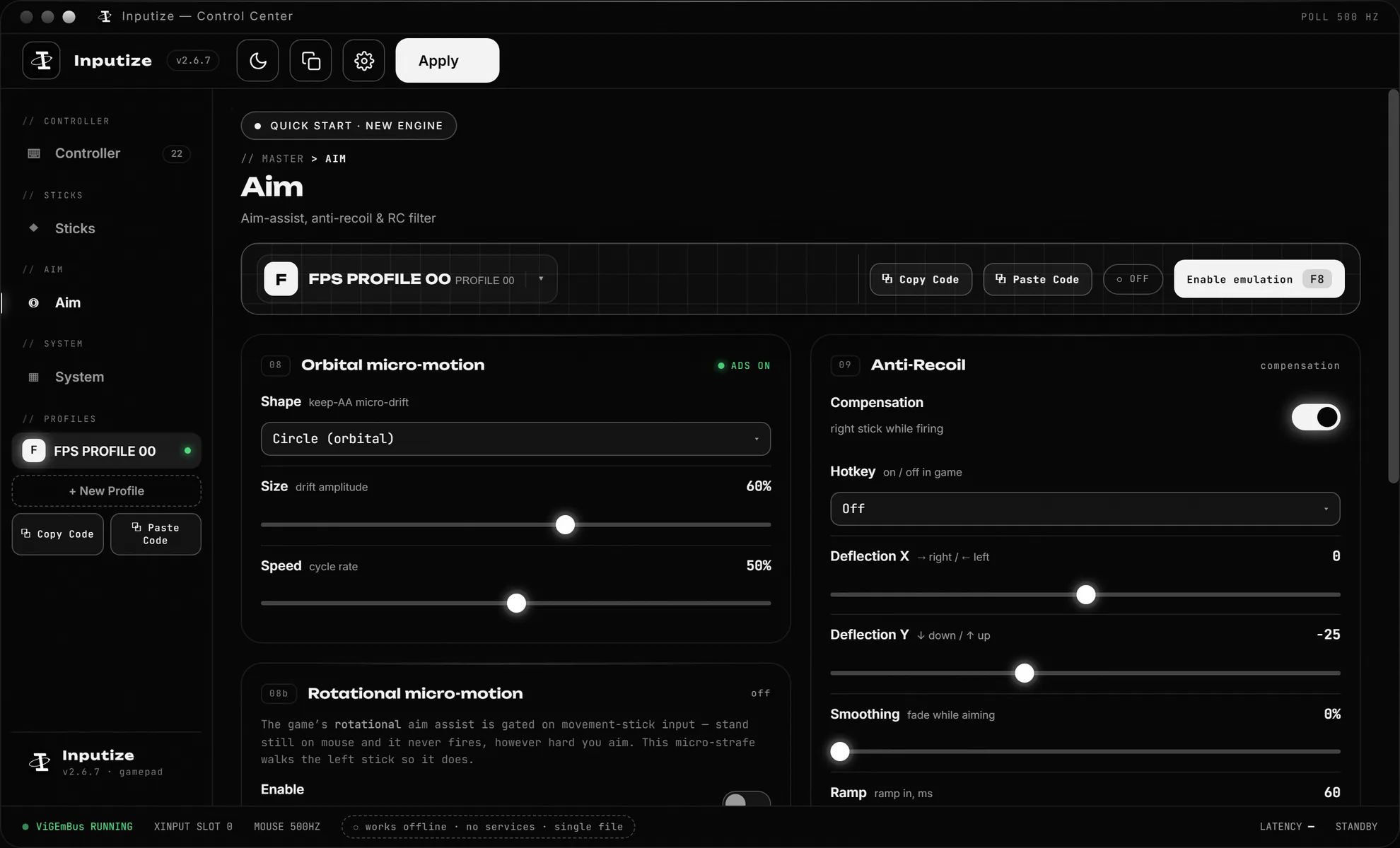
Does mouse get aim assist in Apex Legends?
The short answer, and the mechanics behind it.
Apex applies aim assist strictly to controller input: on PC a raw mouse receives none, while a controller is assisted. This is intentional — the game's tuning assumes a stick, so the only way a mouse player gets aim assist is for the input to arrive as a controller.
Inputize converts your mouse into the analog stick of a virtual Xbox 360 controller (ViGEmBus driver). Apex then classifies your input as controller and applies its built-in aim-assist values to your mouse aim — while you keep the precision of a physical mouse, which a native gamepad simply cannot give.
Because the conversion is layered, Inputize can also shape the stick before the game sees it: response curves take small and large mouse movements and map them onto stick deflection, deadzone removes drift at rest, and anti-recoil compensates while you hold fire.
How it works
What actually happens between your mouse and the game.
Mouse becomes a stick
Inputize routes your mouse through a virtual Xbox 360 controller, so the game sees analog stick input instead of raw mouse axes.
Aim assist engages
Because the input arrives as a controller, the game's built-in aim assist applies to your aiming — and Inputize's engine shapes the stick so it engages smoothly.
Shaped, not raw
Response curves, deadzone and circularity control how mouse speed maps to stick deflection — the layer that decides tracking feel.
Per-game profiles
Each game keeps its own curve, sensitivity and hotkey set. Switch by pressing F8 and play.
Setting it up for Apex Legends
Four steps, about two minutes.
Install — run Inputize, let it set up the virtual driver with one click, press F8 to activate. The overlay confirms the pad is live.
If Apex was already running when you activated the pad, restart it once: the game enumerates controllers at launch. Then set controller input support in Apex settings if prompted.
On the Steam version, keep Steam Input enabled for Apex — the one game where the usual disable-Steam-Input advice is reversed — and keep the always-held button on LS (the Apex template ships it ON).
Tune by feel in the firing range — the response-preview graph makes the input-to-output curve visible while you drag the sliders. Save to the Apex profile and the app auto-switches when Apex is focused.
The Apex template (Apex Legends Linear) is our own tuned Apex setup: the always-held button stays ON (LS by default) so the virtual gamepad never goes idle and native mouse input can't override it — Apex players should keep it enabled. Auto ping ships off in every template — if you want your shots to mark enemies while you keep aiming, bind the game's ping button (RB) once in the Controller view.
Tuning Inputize for Apex Legends
The short version of our settings guide, applied to this game.
Start from the built-in Apex Legends Linear template — our own tuned Apex profile: Linear curve with light Kalman smoothing, always-held LS for hold-to-move, and pre-tuned stick values — then follow the recommended settings guide: deadzones at zero, Direct Stick on, and the aim-chain values in Aim chain.
Apex is fast CQC + tracking: lively micro-aim beats heavy smoothing. If flicks overshoot or small corrections get lost, the guide's symptom table maps each complaint to exact settings.
The honest part
What Inputize does — and what it does not.
Nothing in Inputize touches Apex files, memory or processes — it only changes how Windows reports your input through a signed virtual driver. Whether Apex's anti-cheat accepts a virtual controller is a question only Respawn can answer; read the rules and use responsibly.
Aim assist in Apex on PC is a fixed value on controller input regardless of source, so an emulated pad receives the same assist as a native one — Inputize adds no hidden assist of its own on top.
Questions
Short answers to what people ask most.
Does mouse get aim assist in Apex Legends?
No — with a raw mouse you receive none. Aim assist in Apex is applied to controller input on PC. Inputize routes your mouse through a virtual Xbox 360 controller so the game classifies your input as controller and applies its aim-assist values to that stick — aim assist finally works with your mechanical aim.
Is this the same as a XIM or Cronus?
Conceptually related but different in execution: XIM/Cronus are hardware dongles that translate input on console, and they pass raw translation through a chip. Inputize is a Windows program that converts K&M into a shaped virtual stick: curves, deadzone, circularity, anti-recoil and aim-assist tuning — settings a hardware dongle does not expose.
Will I get banned in Apex for using it?
Only the publisher can answer that, and any tool in this category carries whatever the game's rules say. What we can honestly state: Inputize does not touch game files or processes, holds no cheats, and works purely through a signed virtual input driver. Review the rules, use responsibly.
Do I need to disable aim assist settings or change Apex config?
No config editing is needed. Apex already supports controller input — start Inputize, install the driver if first run, press F8 to activate, and the game sees a controller. If your game was launched before F8, restart it once; some titles ignore controllers that appear after launch.
Why does my aim feel stronger with a curve set?
Because mouse-to-stick mapping is not 1:1. A response curve decides how much stick deflection a given mouse speed produces — flatter near center gives fine control for aim assist to track, steeper at the edges gives fast flicks. That shaping is exactly what makes aim assist engage consistently.
Does Inputize work with Steam or Origin versions?
The game launch platform does not matter — the virtual controller is a Windows-level device, visible to any build that accepts Xbox 360 controllers. If the game sees a pad in its settings, Inputize is compatible. One Apex-specific note: if you play the Steam version, keep Steam Input enabled for Apex — the one game where the usual disable-Steam-Input advice is reversed — and keep the always-held button on (LS in the default layout; the Apex Legends Linear template ships it ON).
Does it work through the Xbox app on PC (Remote Play / Game Pass)?
Yes — the Xbox app on Windows reads any standard XInput controller, and Inputize's virtual pad is exactly that, so it works both in Remote Play streaming from your console and in Apex or Game Pass titles launched through the app. It also runs alongside a real controller: move the mouse and the app picks up the virtual pad, pick up the controller and it takes over.
Is there a trial or is it subscription?
No subscription — €19.99 once with all updates included. Inputize is a digital key delivered instantly: all sales are final and the license is non-refundable, an unused key included.
Can it run simultaneously with other input tools?
We recommend running Inputize alone for the aim-assist use case, since several tools competing for the same virtual slot is how instability happens. A single virtual pad, one driver, one engine — that is the supported configuration.
One payment. Lifetime license.
Virtual controller with aim assist, anti-recoil and response curves — €19.99 once, updates free forever.
Buy Inputize — €19.99