Recommended settings, feature by feature
What to set, what to leave alone, and why — in plain language. One rule above all others on this page: change one thing at a time. A setting you can't explain a reason for is a setting that should stay at its default.
The 5-minute baseline
If you only ever do these four steps, the emulator already works correctly.
1 · Load your game template
Controller view → Game templates. The Apex and Warzone templates ship pre-tuned: mappings, curve, smoothing, always-held button (Apex) — all set. This is the fastest correct start.
2 · Set DPI to 1600 or higher
Mouse software → set 1600 or 3200 DPI once and forget it. Higher DPI gives the engine more counts to work with — cleaner micro-aim. Windows pointer speed at 6/11, Enhance pointer precision off.
3 · Set hip sensitivity by the flick test
Sticks view → Sensitivity. Raise Hip until one comfortable swipe across your mousepad turns the view 180°. Then set ADS to about half of Hip for precise aiming. Full sensitivity guide →
4 · Leave everything else at defaults
The shipped baseline is a clean raw start on purpose: Linear curve, no smoothing, no deadzones, every helper off. Add things from the sections below only when you notice a specific problem.
Sticks: keep these clean
The settings most worth leaving alone — and the one symptom that justifies each change.
| Setting | Set to | Why / turn it when |
|---|---|---|
| LS / RS Deadzone | ● 0 | Your game already applies its own deadzone — stacking ours on top eats small movements twice. Raise the RS deadzone only if the crosshair drifts at rest. |
| Anti-deadzone | ● 0 | Lifts tiny stick values so the game's deadzone can't swallow micro-aim. Only for a game that ignores small movements. |
| Max Zone | ● 100 | Shortens the stick's throw on purpose. Leave full unless you want a shorter, denser throw. |
| Circularity | ● 100 | Keeps the response a circle: diagonals don't over-deflect into the corners. Lower it only for a deliberately squarer feel. |
| Direct Stick | ● On | The stick jumps straight to its target — no extra position smoothing. Turn off only if you want a heavier, "rubbery" analog feel. |
| Poll rate | ● 1000 Hz | Smoother reports to the game. On a weak or old CPU use 500 — and watch the actual Hz indicator in the System view stays green. |
- Preferred — disable Steam Input for the game: Steam → Library → right-click the game → Properties → Controller → set "Override" to "Disable Steam Input". The virtual pad now reaches the game untouched, exactly as Inputize shaped it.
- If the game only works through Steam Input (rare): keep it enabled, then open the game's controller settings in Steam and set both sticks' Dead Zone to 0 (or the minimum) and turn Anti-Deadzone / Output Antideadzone off. Disabling entirely is cleaner — some Steam templates cannot fully zero the outer zone.
- The exception — Apex Legends (Steam): keep Steam Input ON. Apex is the one game where the usual advice is reversed: with Steam Input enabled the pad keeps being polled and behaves as expected. Leave the always-held button on (LS in the default layout — the Apex template ships it ON) and keep the sticks' Steam deadzones at 0 if you touch them.
Aim chain (right stick): add only on a symptom
Each of these fixes one specific complaint. No complaint — no change.
| Setting | Set to | Why / turn it when |
|---|---|---|
| Mouse deadzone (px/s) | ● 0 | Ignores movements slower than the threshold — kills hand tremor and sensor drift. Raise it a few points only if the crosshair trembles at rest. |
| Smoothing | ● Off | Raw input is the sharpest. If your hand shakes at low speeds, switch to Standard mode with Precision 4–6 — it steadies slow tracking almost without costing flick sharpness. |
| Flick-Stop | ● Off — enable on a symptom | The camera keeps turning after an abrupt flick stop? Turn it on — the stick's return collapses to ~35 ms. The engine defaults (jerk 40000, prev 1200, stop 250) are a sane start. |
| Initial Deflection | ● 0 — try 10–20 | Lifts the output floor while the mouse moves, for games whose wide stick deadzone "doesn't hear" small movements. Does not affect the return to center. |
| Turn Speed Cap (Cap drop) | ● 0 — try 30–50 | Discards excess speed at full deflection, so the stick doesn't hold the edge and over-rotate after a flick. Only meaningful once flicks actually reach full deflection. |
| Magnitude / Angle quantization | ● 0 — try 20–40 / 0–20 | Discrete steps make the game read the input as a "real analog pad" — its built-in aim assist bites harder. Add only if the assist feels weak. Aggressive values change the feel noticeably. |
| Magnitude Speed | ● 0 — try 60–80 | Makes the quantization grow with mouse speed: slow fine-aim stays smooth, flicks go coarse. Works together with Magnitude quantization. |
SAB: the human pacing
Real thumbs never move a stick 0→100% in one tick. SAB rebuilds every gesture as an eased human ramp.
| Setting | Set to | Why |
|---|---|---|
| Movement SAB (left stick) | ● 60–80 | WASD ramps to full deflection like a thumb press (~20 + 2×value ms) instead of snapping. Add Variance 35 and Micro 35 so no two gestures are identical. |
| Aiming SAB 2 (right stick) | ● 50 | The same human pacing for aim. Sub-sliders around 50. Watch the Input monitor: ring = your target, dot = pad output — the gap between them is the ramp itself. |
| Trigger SAB (LT / RT) | ● LT 40–60 · RT 0 | The aim trigger (LT) squeezes like a real trigger. Leave RT instant — a delay on fire is the worst place to spend milliseconds. |
| WASD Repeat Delay | ● 0 in matches | A menu-navigation aid, not an aim setting: a minimum gap (try 150–300 ms) between discrete WASD taps so game menus stop skipping two items per press. Holding W to run is never delayed. Keep a separate "menu" profile and switch with F9/F10. |
Micro-motion: keep the game's aim assist awake
Many games fade their built-in assist when the stick reads as "dead". A slow micro-motion keeps it engaged.
| Setting | Set to | Why |
|---|---|---|
| Orbital micro-motion (right stick) | ● On in ADS: strength 10–15, speed 50 | While you aim, the stick traces a slow drift (up to ~20% travel at 100) so the game never deems it dead and its assist stays active. Hipfire is untouched. Turn it off if the drift bothers your hold. |
| Rotational micro-motion (left stick) | ● Optional: strength 10, speed 50, gate ADS | Keeps the game's rotational assist alive while you stand still — it gently strafes for you. Try it in the firing range first: it does move your character. The moment you press a WASD key, your real input wins completely. |
Anti-recoil: tune per gun, not globally
Off until you sit down with one gun in a firing range and dial it in.
| Setting | Set to | Why |
|---|---|---|
| Enabled | ● Off until tuned | A generic value helps one gun and hurts the next. Tune on the gun you actually main. |
| Y deflection | ● 10–20 (down) | Pushes the stick down against the camera kick. Raise until the crosshair holds level on full auto — then stop. |
| X deflection | ● per gun | Only for guns that drift sideways. Most need 0. |
| Ramp / Release | ● 120 / 120 ms | Smooth entry and return — no yank the moment fire starts or a snap when it ends. |
| Delay | ● 0 (semi-auto: 50–100) | A pause before compensation starts, so the first shots of single fire are not over-compensated. |
The full firing-range drill lives in the Warzone anti-recoil guide.
Curves — and the Warzone mirror trick
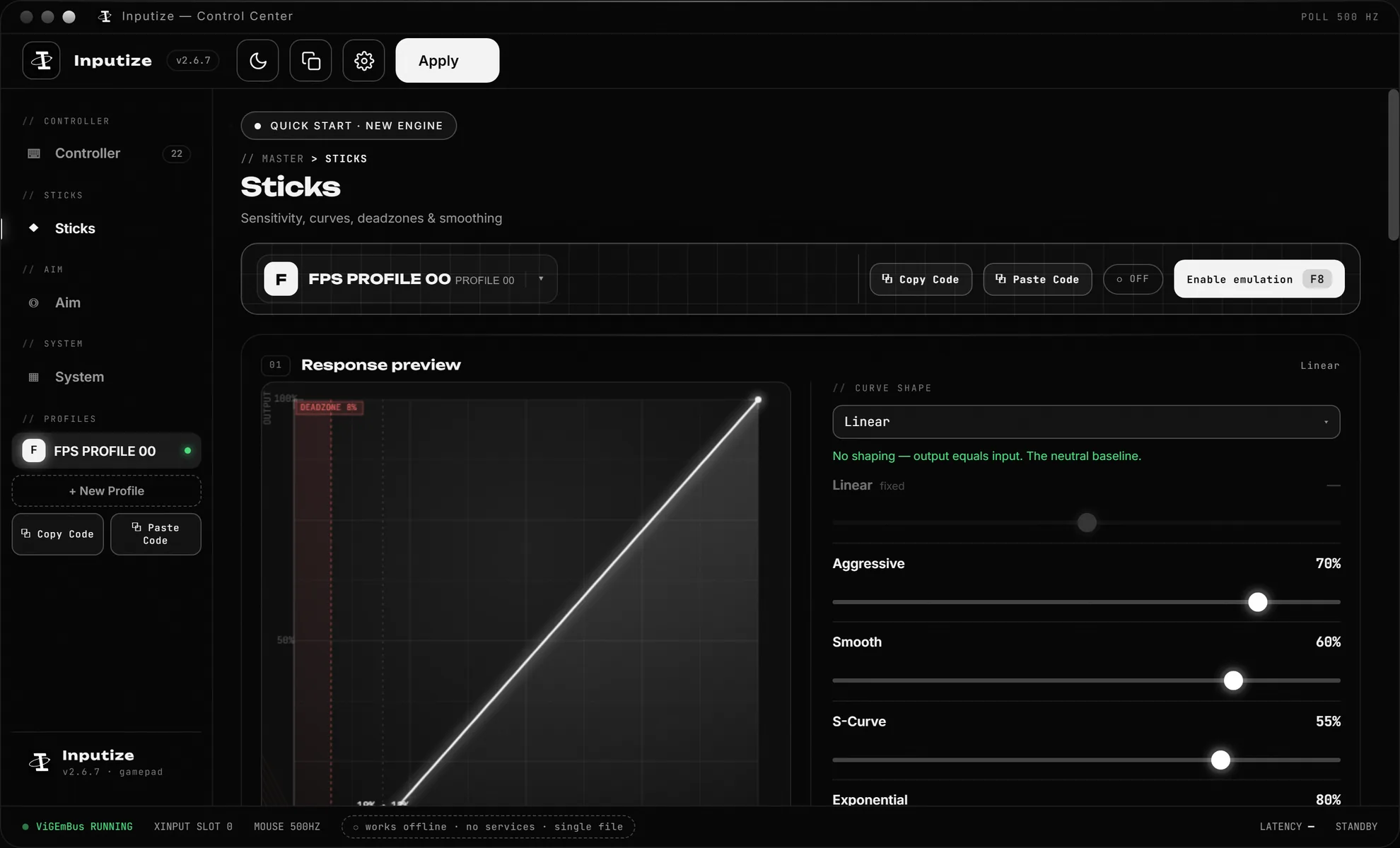
The curve decides what a given mouse speed does to the stick. Start linear, then shape by feel.
| Preset | Feel | Pick it when |
|---|---|---|
Linear | Plain 1:1 | Default — predictable, what every recommendation above assumes. |
Aggressive | Fast launch | Turns feel slow to start — you want more out of small wrist moves. |
Smooth | Precise start | Small moves overshoot — you want a gentler low end for tracking. |
S-Curve | Soft ends, confident middle | You want both ends calmed at once. |
Exponential | Soft center, hard flicks | Precise tracking plus violent flicks. |
Every preset has a strength slider from −100 to +100: 0 switches the curve off (plain linear), +100 is the full shape, and a negative value is the same shape mirrored — a fast launch becomes a slow one. The two ends never move: no input is still no output, full deflection is still full deflection. All presets compared →
Settings that should never stack
The same symptom often has two sliders that "fix" it — using both overshoots and muddies the signal.
| Don't combine | What goes wrong | Do this instead |
|---|---|---|
| Game's deadzone + emulator deadzone | Micro-aim swallowed twice | Keep Inputize deadzones at 0; the game's own zone is enough. |
| Initial Deflection + Turn Speed Cap, blindly | Flicks both start fake-high and get capped — mushy feel | Add one, test in the firing range, then decide if the other is still needed. |
| Curve strength + Smoothing for the same problem | Both soften the same signal — aim goes floaty | Shaky hands → Smoothing. Wrong speed shape → curve strength. Not both. |
| WASD Repeat Delay + heavy Movement SAB in menus | Taps feel laggy twice over | For a menu profile raise the Repeat Delay and keep Movement SAB as-is. |
| Quantization + both micro-motions at once | Can't tell what actually helped the assist | Add one, measure, then add the next. |
"It feels like this" → set this
Complaints the way players actually say them, each with the shortest fix. Find yours, change one thing, re-test for ten minutes.
| It feels like… | Set this |
|---|---|
| "My aim feels jagged, not smooth" | Smoothing → Standard mode, Precision 4–6, Response 50. If the aim starts to lag instead, you over-did it: Precision 2–3, or back to Off. |
| "The crosshair trembles when I hold still" | Mouse deadzone 2–5 px/s (Sticks view). Raise until the tremble stops — no higher, it starts eating small aim. |
| "Flicks overshoot the target" | Turn Speed Cap 40. Still overshooting → Flick-Stop on with the default values (jerk 40000 / prev 1200 / stop 250). |
| "The camera keeps turning after I stop the mouse" | Same symptom, same fix: Flick-Stop on. It collapses the stick return to ~35 ms after an abrupt stop. |
| "Flicks fall short — big turns feel slow" | Raise Hip sensitivity one step at a time. If small moves feel right but big turns lag, add the Aggressive curve at strength +50…+100. |
| "Small tracking adjustments get lost" | RS Anti-deadzone 10–20. If the game ignores small movement entirely (wide stick deadzone), use Initial Deflection 10–20 instead — never both. |
| "Aim assist feels weak" | Quantization Magnitude 30 / Angle 15 / Magnitude Speed 70, and Orbital micro-motion on (strength 12, speed 50). Re-test in a real match, not a menu. |
| "Aiming in ADS is too twitchy" | Drop ADS to about half of Hip (e.g. Hip 40 → ADS 20). Keep Y multiplier at 1. |
| "Diagonals turn faster than straight lines" | Circularity 100 on both sticks — diagonals stop over-deflecting into the corners. |
| "Menus skip two items per keypress" | WASD Repeat Delay 150–300 ms — in a separate "menu" profile. Matches stay at 0; holding W to run is never delayed anyway. |
| "Movement starts late, character feels floaty" | Movement SAB is too strong for you: 60–80 → 40, or 0 to disable the ramp. Keep Direct Stick on. |
| "Shots feel delayed when I click" | RT SAB 0 (never smooth the fire trigger) and RT threshold at the default 25. If a game still feels late, check its own input lag settings — not the emulator. |
| "Recoil pulls my view up" | Anti-recoil on, Y 10–20 (down), Ramp/Release 120/120 ms — tuned on your main gun in a firing range, not globally. |
| "Tuned everything, but aim still feels off in a Steam game" | Steam Input is re-shaping the pad behind your back: right-click the game → Properties → Controller → Disable Steam Input (details in the Sticks section). Or set its deadzones to 0 if the game needs Steam Input. Exception: Apex (Steam) — keep it enabled. |
| "Everything feels mushy and 'soapy'" | Reset to clean: Smoothing Off, curve strength 0 (Linear), quantization 0, Direct Stick on. Confirm it feels right — then re-add exactly one thing. |
Nothing here helped? Check the troubleshooting table in the manual — the symptom may not be a settings problem at all.
Questions
Short answers to what people ask most.
Do I need to change all of these settings?
No. Load your game template, set hip sensitivity with the flick test, and you are done for most games. Every recommendation on this page is a change from the default with a specific reason attached — if your reason is not on the list, the default is fine.
Which settings matter most?
Three things do most of the work: hip/ADS sensitivity, the response curve, and the SAB master sliders. Everything else on this page is fine-tuning you add one slider at a time when a specific symptom shows up — overshooting flicks, weak aim assist, menu skipping.
Is a higher value better?
No. Almost every slider trades one feel for another. Turn Speed Cap trades a little top-end speed for clean flick stops; quantization trades signal smoothness for a stronger built-in aim assist. The right value is where your aim feels predictable, not the maximum.
Why is everything off by default?
The shipped baseline is a deliberate clean start: Linear curve, no smoothing, no deadzones, no quantization, every helper off. That way any change you make is one change, and you can always tell what a setting actually did to your aim.
How do I test a change properly?
Change one slider at a time and give it ten minutes in a training mode or firing range before judging. A change you can not feel in ten minutes of real aiming is not worth keeping — revert it and move on.
Do these settings affect ban risk?
No. Safety is about architecture — no injection, no game files touched, the same Microsoft-signed ViGEmBus driver as DS4Windows and Parsec — and that does not change with sliders. What a given game's anti-cheat tolerates is always the publisher's call; check the rules of what you play and see the safety page for the honest per-game picture.
One payment. Lifetime license.
Virtual controller with aim assist, anti-recoil and response curves — €19.99 once, updates free forever.
Buy Inputize — €19.99